If you’re sending cold emails, running outreach campaigns, or launching a new domain, there’s one thing you care about more than anything:
Are my emails landing in the inbox?
Because if they’re hitting spam, nothing else matters.
Two of the biggest factors that determine inbox placement are:
- Email warmup
- DMARC (plus SPF and DKIM)
Let’s break this down in plain English and talk about how tools like Instantly.ai and PowerDMARC help you build trust with Gmail, Outlook, and other email providers.

Why Email Warmup Matters (Especially for New Domains)
When you create a brand-new email address or domain, email providers don’t trust you yet.
To Gmail, you’re a stranger.
If you suddenly start sending 50–100 cold emails per day, that looks suspicious. And suspicious behavior often leads to spam folders — or worse, account restrictions.
That’s where email warmup comes in.
Email warmup is the process of gradually building a positive sender reputation by simulating natural email activity over time.
Think of it like “credit building” for your email account.

How Instantly’s Warmup Actually Works
Instantly uses an automated peer-to-peer warmup network.
Here’s what happens when you connect an account and turn on warmup:
- Your email sends messages to other accounts inside the warmup network
- Your inbox receives messages from other warmed accounts
- Those emails are automatically opened
- Many receive replies (with positive sentiment)
- If something lands in spam, it’s automatically moved to inbox
From an email provider’s perspective, this looks like healthy, normal human behavior.
High open rates.
Consistent replies.
Inbox activity.
Those are all strong positive engagement signals.
Over time, Gmail and Outlook start to view your account as legitimate and trustworthy.
What Warmup Really Improves
When done correctly, warmup helps with:
- Building domain reputation
- Improving inbox placement
- Increasing open rates
- Reducing spam placement
- Preparing accounts for cold outreach
It doesn’t magically guarantee inbox placement — but it dramatically increases your odds.
And it’s especially critical for new domains.
Best Practices for Email Warmup
Here’s where a lot of people mess up: they rush it.
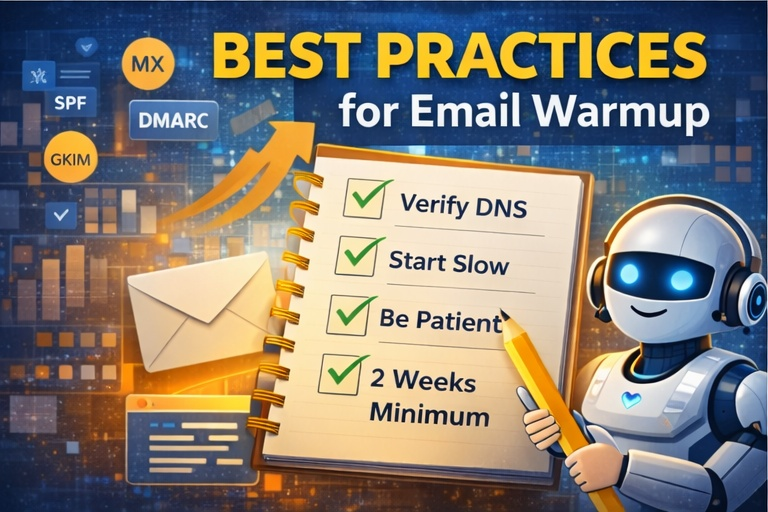
If you want your warmup to actually work, follow these fundamentals:
1. Make Sure Your DNS Is Set Up Correctly
Before warmup even starts, your domain should have:
- MX records
- SPF
- DKIM
- DMARC
Without proper authentication, warmup won’t help much.
2. Start Slow
For brand-new accounts, stick to about 10 warmup emails per day at first.
You can gradually increase volume — but don’t spike it overnight.
3. Be Patient
Warmup takes time.
A good rule of thumb:
- Minimum 2 weeks of warmup
- Warmup health score above 90%
- Then start campaigns slowly
This patience is what separates successful cold email senders from people who constantly burn domains.
Now Let’s Talk About DMARC (The Backbone of Deliverability)
Warmup builds reputation.
DMARC protects it.
DMARC stands for Domain-based Message Authentication, Reporting, and Conformance. It works alongside SPF and DKIM to prove that your emails are legitimately coming from your domain.
Without DMARC, you’re missing a critical layer of trust.
What SPF and DKIM Do (Quick Breakdown)
Before DMARC works properly, you need:
SPF (Sender Policy Framework)
This tells email providers which servers are allowed to send email on behalf of your domain.
DKIM (DomainKeys Identified Mail)
This adds a digital signature to your emails to verify they haven’t been altered in transit.
DMARC ties these together and tells receiving servers what to do if authentication fails.
Why DMARC Is So Important for New Domains
If you’re launching a new domain, DMARC helps you:
1. Establish Trust Faster
Email providers see that you’re properly authenticated and serious about security.
That builds credibility.
2. Prevent Spoofing & Phishing
Without DMARC, someone could impersonate your domain.
DMARC tells providers how to handle unauthorized emails claiming to be from you.
This protects your brand and reputation.
3. Improve Deliverability
When SPF, DKIM, and DMARC are aligned correctly, your emails are far more likely to land in the inbox instead of spam.
For cold outreach, this is critical.
4. Gain Visibility
DMARC reporting gives you insight into:
- Who’s sending email from your domain
- Authentication pass/fail rates
- Potential unauthorized usage
That visibility gives you control.
How PowerDMARC Helps
Setting up DMARC manually can feel technical and confusing.
PowerDMARC simplifies the process by helping you:
- Generate proper DMARC records
- Choose the right policy
- Monitor reports
- Validate authentication
Instead of guessing at DNS settings, you get structured guidance.
What DMARC Policy Should You Use?
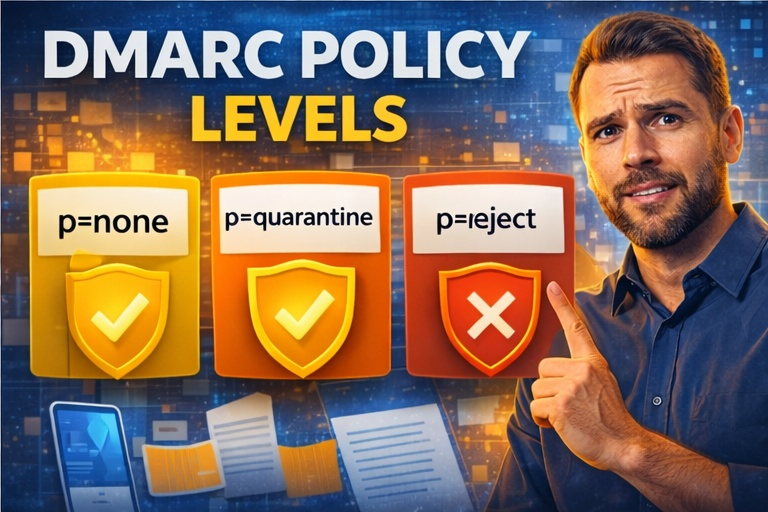
There are three main policy levels:
- p=none → Monitor only
- p=quarantine → Send failing emails to spam
- p=reject → Block failing emails entirely
If you’re launching a new domain, start with:
p=none
This lets you monitor reports without blocking legitimate emails accidentally.
Run this for at least a week (often longer) to ensure everything is properly authenticated.
Once you’re confident:
Move to p=quarantine, then eventually p=reject.
The phased approach prevents costly mistakes.
The Big Picture: Warmup + DMARC Together
Here’s the simple formula:
- Warmup builds engagement signals
- SPF/DKIM prove identity
- DMARC enforces policy
- Consistency builds reputation
When you combine:
- Proper DNS setup
- Gradual email warmup
- DMARC monitoring
- Controlled sending volume
You dramatically improve your chances of landing in the inbox.
Final Thoughts
If you’re serious about email outreach — whether for sales, real estate, recruiting, or marketing — you can’t ignore infrastructure.
Skipping warmup is risky.
Skipping DMARC is reckless.
Email deliverability isn’t about hacks. It’s about trust.
Build trust slowly.
Authenticate properly.
Scale responsibly.
Do that, and your emails won’t just send — they’ll actually get read.